Tools & Toolkits
Tool execution failures (401/403 errors)
Authentication and permission errors typically occur due to:
Missing scopes
The tool you're calling may require OAuth scopes that weren't granted when the user authenticated. Re-authenticate the user with the required scopes, or check the toolkit's documentation for which scopes each tool needs.
Insufficient permissions
Verify the connected account has necessary permissions:
- Admin requirements: Some tools require admin-level access
- Paid accounts: Certain toolkits need paid subscriptions
- Example: MS Teams requires Microsoft 365 account + Azure AD tenant
API returning fewer tools than expected
If the Get Tools API returns fewer tools than what's shown on the platform UI, check which API version and toolkit version you're using.
GET /api/v3.1/tools defaults to the latest toolkit version.
GET /api/v3/tools defaults to the base version (00000000_00), which may exclude newer tools.
To get all available tools on v3, pass toolkit_versions=latest:
curl 'https://backend.composio.dev/api/v3/tools?toolkit_slug=googledrive&toolkit_versions=latest' \
  -H 'x-api-key: YOUR_API_KEY'
See Toolkit versioning for more details.
Tool not working
- Check tool-specific documentation for requirements
- Verify the connected account is active and properly authenticated
- Test with the latest SDK version
Reporting tool issues
When reporting to support, provide:
-
Error message: Complete error details. For example:
{ "data": { "message": "{\n \"error\": {\n \"code\": 404,\n \"message\": \"Requested entity was not found.\",\n \"errors\": [\n {\n \"message\": \"Requested entity was not found.\",\n \"domain\": \"global\",\n \"reason\": \"notFound\"\n }\n ],\n \"status\": \"NOT_FOUND\"\n }\n}\n", "status_code": 404 }, "successful": false, "error": "404 Client Error: Not Found for url: https://gmail.googleapis.com/gmail/v1/users/me/messages/123456?format=full", "log_id": "log_tVqomBgg11-t" } -
Log ID: From the error response (
log_idfield), or find it in the dashboard Logs page: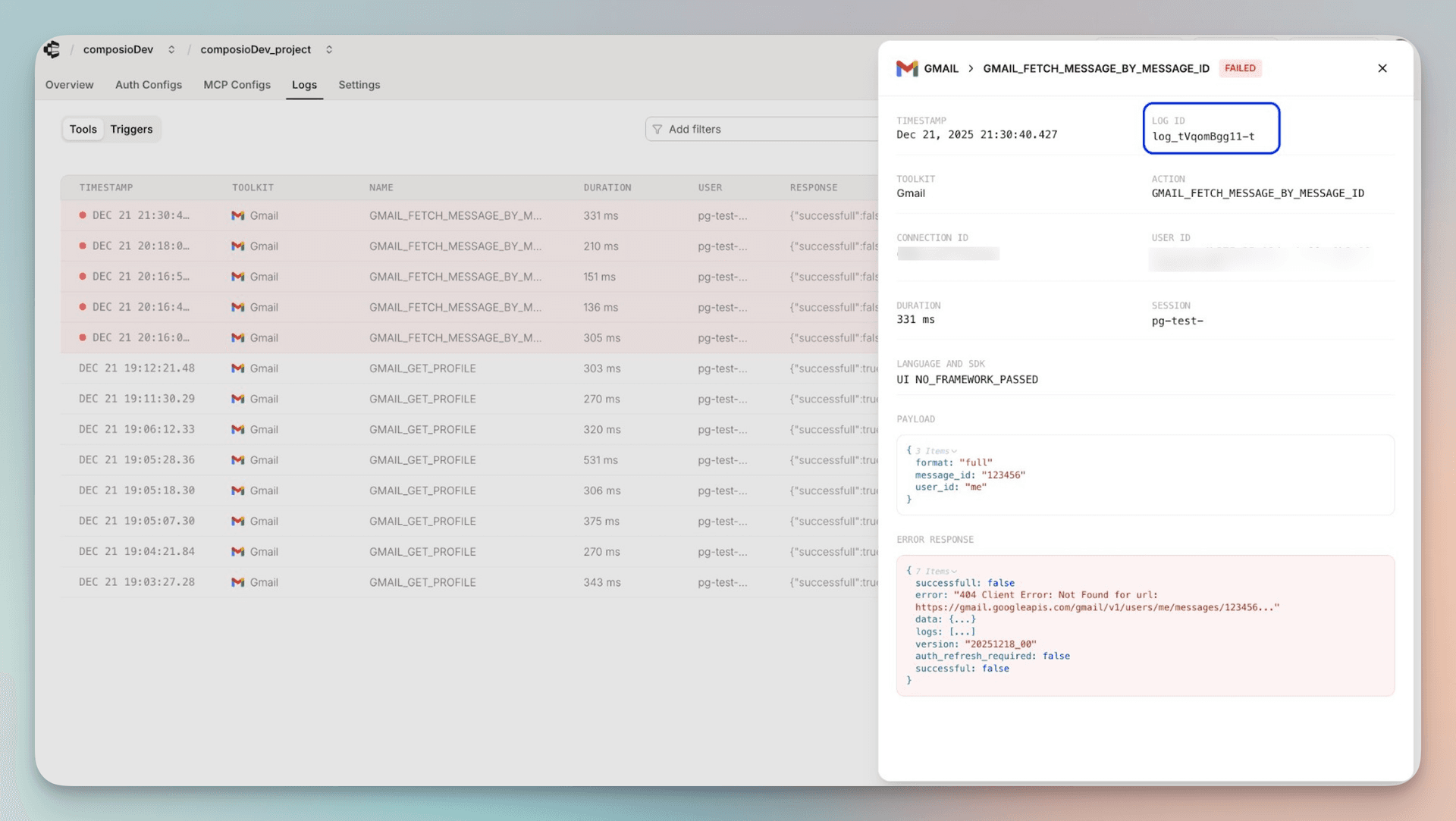
-
Tool name: Exact tool slug being executed (for example,
GMAIL_FETCH_MESSAGE_BY_MESSAGE_ID) -
Connected account ID: Account used for execution (for example,
ca_xxx)
Getting help
- Email: support@composio.dev
- Discord: #support-form